How to find similar tracks in Rekordbox: Collection Radar, explained
Rekordbox 7 can find tracks in your collection that sound like the one you’re playing. The feature is called Collection Radar, it lives in the Track Suggestion panel, and it works on the Free plan. It ranks by the audio, not your tags, and in my testing its picks were mostly good.
What it won’t do is show you how close a match is, or let you steer the search beyond BPM, key and vocals. This guide covers how to set it up, what testing shows about how it works, where it falls short, and what Spektra, a desktop tool for reading your library by sound, does differently.
By Alex. I build Spektra, which is covered at the end. The guide is written to be useful whether or not you ever try it. Checked against Rekordbox 7.2 · October 2026.
What Collection Radar is
Track Suggestion arrived in Rekordbox 7.0 in 2024. It offers five kinds of recommendation:
- Era, Mood and Association work from your tags and metadata.
- Collection Radar and Streaming Radar look for “similar musical characteristics”, using what AlphaTheta calls “unique algorithms developed using AI learning”.
Collection Radar searches the tracks you own. Streaming Radar searches the streaming services Rekordbox connects to. Both take a seed, either the track on the master deck or one you pin from a deck, and return a ranked list.
AlphaTheta doesn’t say which characteristics it compares or how the ranking works. That’s what the testing below is for.
How to set it up
- Turn on Radar Analysis. Go to Preferences › Analysis › Track Analysis and check that Radar Analysis is ticked. Read the help text beside it before you do. It’s quoted in full in the next section.
- Analyze your collection for it. Radar needs its own analysis data on each track. New tracks get it when they’re analyzed. For a library you already have, select everything in Collection, right-click and choose Add New Analysis Data. On a big library this takes a while. Tracks without the data show
[?☆]. They can’t be recommended, and they can’t be the seed. - Open Track Suggestion › Collection Radar. Choose Master to follow whatever is playing, or pin Deck 1–4 to hold a seed while you browse.
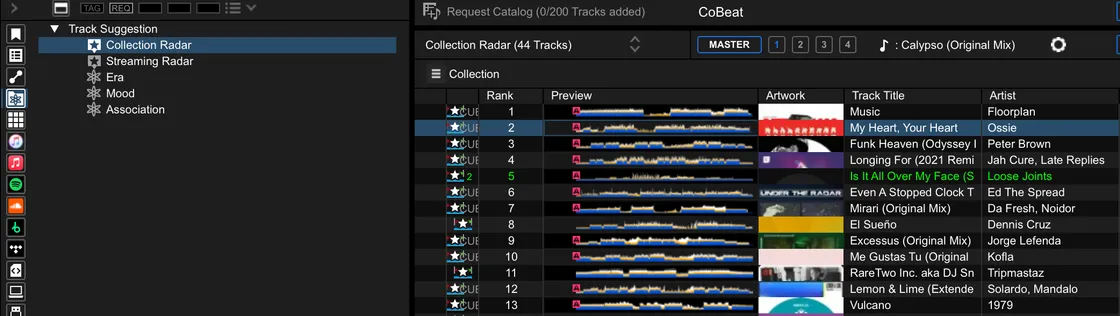
- Set the conditions. The gear icon opens “Customize conditions of tracks to recommend”. You get three controls:
- BPM ± a number of BPM (not a percentage).
- Key: Same key, or one of three Related key settings.
- Vocal: Instrumental, or Song including vocals.
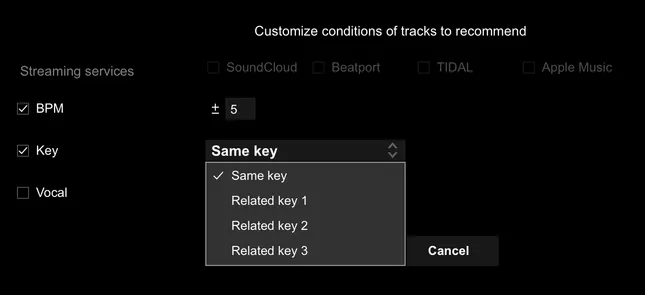
A good start is BPM ±5 with Key and Vocal off. If your seed sits at a tempo your library barely covers, untick BPM entirely (see Tempo is all or nothing).
- Read the list. Results come ranked, up to 100 of them. Rank is the only measure you get.
What’s going on under the hood
AlphaTheta publishes very little about Collection Radar, so I tested it in Rekordbox 7.2. Here’s what I saw. Where something is a guess, it says so.
What turning on Radar Analysis means
This is the help text beside the setting, word for word:
Recommends tracks with similar characteristics by using track analysis data on the cloud server. If you enable this setting, you can use Collection Radar/Streaming Radar. This function collects customer track analysis data and provides analyzed tracks.
*This track analysis data collected from the customer is stored securely and does not include the customer’s personal information.
*Track Analysis may take a moment.
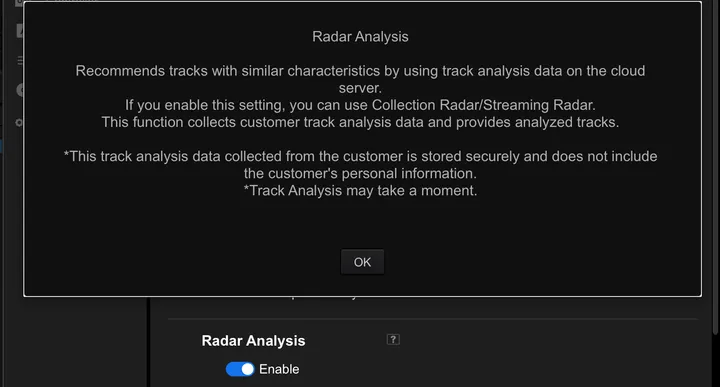
So turning it on shares your tracks’ analysis data with AlphaTheta. Whether that’s a fair trade is your call. Now you know it’s part of the deal.
Is it really listening?
Yes. I made a copy of a track with identical audio and every tag stripped (no title, artist, genre or label), imported it, and ran both copies as seeds.
- The original ranked #1 on the copy’s list.
- 97 of the 100 results were the same tracks, in the same order.
If tags fed the ranking, a track with no tags would have come back with a different list. Collection Radar ranks from the audio analysis. One caveat: BPM and key come from the audio too, so this test can’t say how much more than tempo and key it hears. In my listening tests most of its picks fit by ear, which matching tempo and key alone wouldn’t manage.
It works offline
With Wi-Fi off, Collection Radar still returned results, and a newly imported track was analyzed and became a usable seed. The ranking runs on your machine.
Tempo is all or nothing
The BPM condition is a hard window. At ±5, nothing at ±6 can appear, however close it sounds. Untick BPM and Collection Radar ranks across tempo without trouble. With a 155 BPM hardgroove seed, its top 20 ran from 124 to 146 BPM.
The window matters most at the edges of your library. For a 115 BPM disco house seed, the closest-sounding tracks sat at 121–127 BPM, just outside ±5. Inside the window, both tools ran out of good matches and filled up with slow progressive house.
The list stops at 100, and has no floor
Collection Radar lists every track that passes your conditions, ranked, up to 100. If only 82 tracks fall inside the window, you get 82, and the last of them can be poor matches. Nothing on the list tells you where the good ones end.
Where it falls short
None of these make Collection Radar bad. It finds good tracks. These are the things it doesn’t let you do.
- You can’t tell how close anything is. Rank 3 and rank 30 look the same. For the disco house seed, Collection Radar’s #2, #3 and #4 were all misses, shown with the same confidence as the hits around them.
- You can’t see why a track is there. For the hardgroove seed, rank 4 was a funky house track. The list gives no hint why. The only way to find out is to load it and listen.
- You can’t steer it. You get BPM, key and vocals. There’s no “like this, but darker” or “less low end”.
- One seed at a time. It can’t answer “what sits between these two tracks?” or “what’s close to any of these five?”.
- Tempo is all or nothing. A fixed window or no limit, with nothing in between.
- A hundred results, at most. Anything past rank 100 never shows up.
Related Tracks is a different tool
Rekordbox’s older Related Tracks feature gets confused with Collection Radar, but it doesn’t listen at all. It’s a rule filter over your tags: BPM within a range, related key, same genre, label or artist, rating, My Tag, play history. You choose the rules, and it lists whatever matches.
That makes it predictable, and it works on CDJs from a USB stick. But matching tags isn’t the same as sounding alike. Two tracks at 128 BPM in 6m will mix. That doesn’t mean they belong in the same set.
Use Related Tracks for “what will mix next”. Use Collection Radar for “what sounds like this”.
What Spektra does differently
I ran Collection Radar and Spektra’s Sound Like side by side on four seed tracks, blind (how is at the end of this section). On similarity alone they were close: both mostly picked tracks that fit, and each found tracks the other missed. If all you want is “more like this”, Collection Radar is already in your Rekordbox.
Spektra is built for the work around that list: seeing where the matches sit, steering the search, and turning what you find into a set. It runs on your desktop and works with Rekordbox (local audio files): it imports your collection from Rekordbox’s XML export and analyzes every local audio file in it. Streaming tracks aren’t analyzed.
A map instead of a list
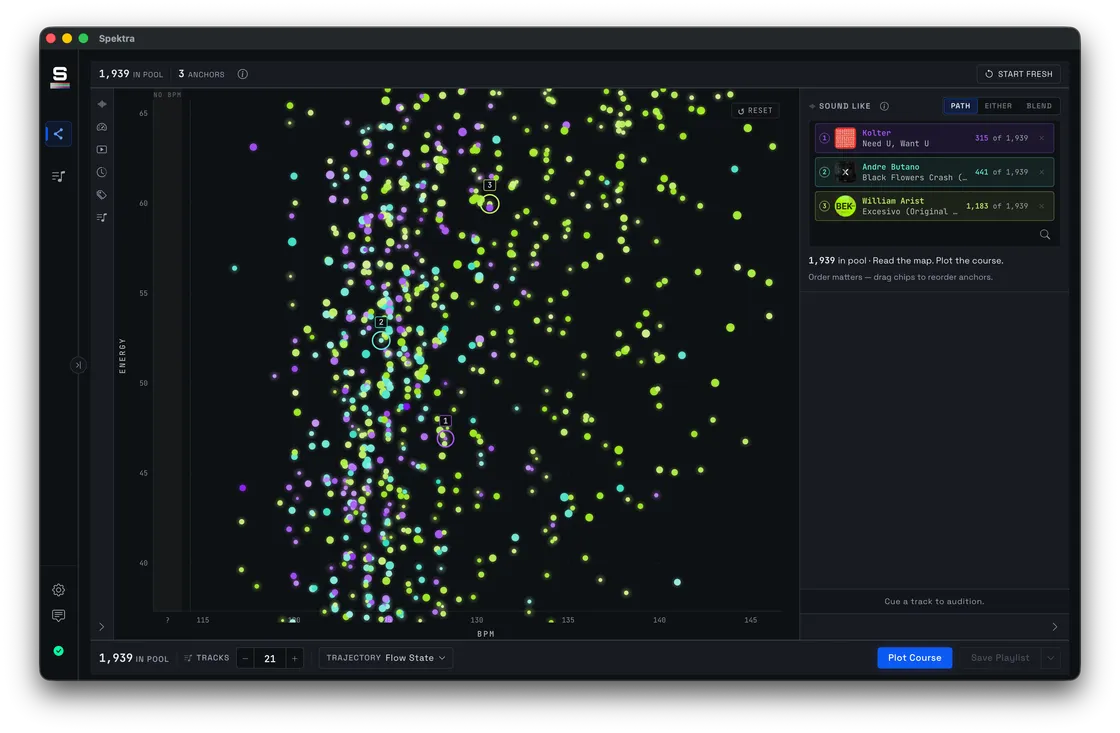
The Observatory puts your whole library on one map. Each track is a star: BPM runs across, Energy runs up, size shows Bass Density and brightness shows Color. Pick a track and its Sonic Neighbors light up where they sit, so you can see which are at your tempo, which run hotter and which carry more low end before you play any of them. Audition any star in place, before it goes anywhere near a deck.
You can see how close a match is
Hover a Sonic Neighbor to see its rank and similarity score, like #3 · 0.87. The list scales with your library (up to 500 tracks) and stops when matches fall below a similarity floor, instead of filling up to a fixed count. For the disco house seed, Spektra’s three weakest picks were all misses, and they were the only ones under that floor. The score helps least in the busiest parts of a library, where many tracks score almost the same.
More than one anchor
Sound Like takes up to five anchors, with three ways to combine them:
- Path walks from one anchor to the next, in the order you set.
- Either finds what’s close to any of them. A wide net.
- Blend finds the common ground between all of them.
That answers questions a single seed can’t: what sits between these two tracks, or what’s close to any of these five.
Steer by sound
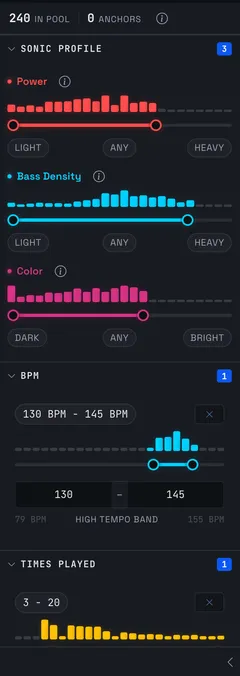
Power, Bass Density and Color ranges, drawn over your own library, narrow the search by what the tracks sound like: like this, but with less low end. Collection Radar’s conditions stop at BPM, key and vocals.
From a list to a set
When you have tracks you like, Plot Course puts them in order, with Open Key harmony and an energy arc. Save it as a Playlist and the Recon Deck plays it through as crossfaded clips, so you can hear whether it holds together. Export it as an M3U8 and import it into Rekordbox, where Collection Radar and Related Tracks take over at the decks.
Where the analysis happens
Spektra’s analysis runs on your machine, and your library and analysis stay there. No account, no cloud, no telemetry.
About what leaves your machine: Except a check for updates, and anything you choose to send. What the app sends
What Spektra doesn’t do
- It doesn’t follow the master deck live. Nothing reaches your CDJs except the playlists you export.
- Local files only. Streaming Radar covers streaming, and Spektra doesn’t.
- The first analysis reads every file in your library and takes a while.
- It’s in free beta now. Version 1.0 will be a one-time purchase.
How I compared them
Same library, same four seeds, chosen before either tool ran: a tech house track and a melodic house track with vocals, both in the busiest part of the library; a slow disco house track with few close neighbors; and a 155 BPM hardgroove track. Both tools used the same BPM conditions. I took each tool’s top 20, merged and shuffled them so I couldn’t tell which tool found which track, and marked each against one question: would I mix this into or out of the seed in a set? I did the scoring, and I build Spektra, so weigh that.
Using both
They work well together. Run your Rekordbox XML through the Library Explorer to see what’s buried in your collection. Bring the collection into Spektra to read the map, find sonic neighbors and plot a course. Export the course as an M3U8, import it into Rekordbox, and let Collection Radar suggest what’s next while you play.
FAQ
- Why does Collection Radar show nothing?
- Usually Radar Analysis is off, or the seed has no recommendation analysis data. Check Preferences › Analysis › Track Analysis, then right-click the seed and choose Add New Analysis Data. If it still shows little, widen the BPM window or turn off Key.
- What does [?☆] mean in Track Suggestion?
- The track has no Radar analysis data yet. It won't be recommended, and it can't be the seed until it's analyzed.
- Does Collection Radar send my data anywhere?
- Rekordbox's own help text says Radar Analysis "collects customer track analysis data", which it says is stored securely and doesn't include personal information. Recommendations themselves work offline.
- Does Collection Radar work offline?
- Yes. In my testing it returned results with Wi-Fi off, and analyzed a new track offline too.
- Do I need a paid Rekordbox plan?
- No. Track Suggestion, including Collection Radar, works on the Free plan in Rekordbox 7.2.
- What's the difference between Collection Radar and Related Tracks?
- Related Tracks filters by your tags: BPM, key, genre, label, rating and so on. Collection Radar ranks by how the tracks sound. Related Tracks tells you what will mix. Collection Radar tells you what sounds alike.
- How is Spektra different from Collection Radar?
- At finding similar tracks, they're close. Spektra adds a map of your whole library, a similarity score you can see, up to five anchors at once, and Power, Bass Density and Color ranges for steering. Plot Course then puts what you find in order as a playlist.
- Can Spektra write back into Rekordbox?
- Not directly. Spektra exports playlists as M3U8 files, which you import into Rekordbox.