Changelog
Every release since the beta opened, newest first. What shipped, what broke, and what got fixed — the same record the testers get.
v0.10.3
CurrentFixed
On Windows, updating in place always failed with
Couldn't update in place; from 0.10.2 or earlier, install this release from the download page.A long update error in the update banner could push the manual download link out of view.
Changed
Updated Electron to 43.8.3 and zod to 4.6.7 to pick up security fixes.
v0.10.2
Added
A new library's first import opens a short, skippable tour of the Observatory that ends at your first course.
A one-time card tells new users when the map is complete and Plot Course is ready.
"Take the tour" in the Observatory guide replays the intro at any time.
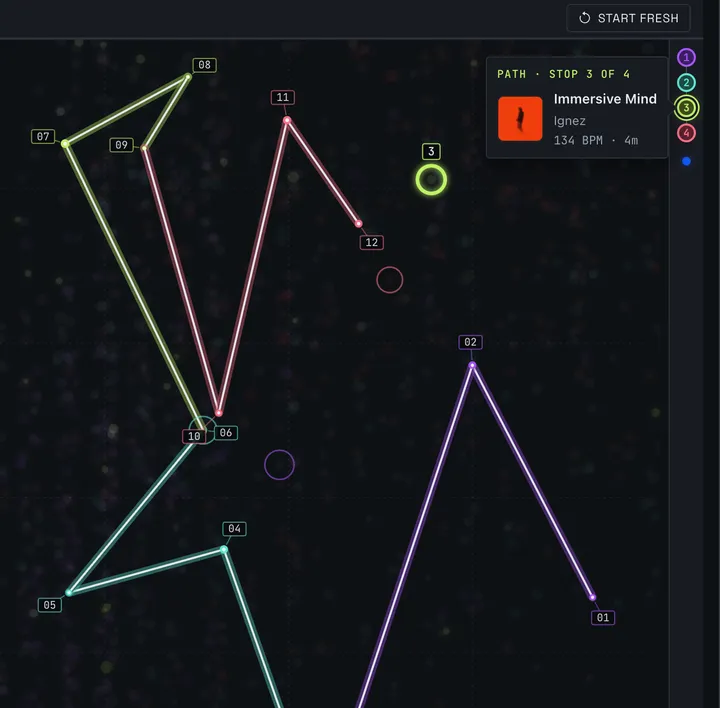
The collapsed right rail shows a marker for each anchor in its map color, with the track's details on hover.
Changed
Plot Course cues the new course's first track in the rail, so a single Play starts the course.
Hovering or focusing an anchor chip dims the other anchors' neighborhoods on the map.
Fixed
The Observatory guide said auditioning meant cueing tracks into the Recon Deck.
v0.10.1
Fixed
On Linux, 0.10.0 stopped at "The library database could not be updated" with a "GLIBC_2.38 not found" error on Ubuntu 22.04, Debian 12, Linux Mint 21, Pop!_OS 22.04 and other systems older than Ubuntu 24.04. Both the AppImage and the .deb open the library again.
Changed
Spektra on Linux needs glibc 2.35 or newer (Ubuntu 22.04, Debian 12 or later). The .deb now says so, so apt declines to install it on an older system instead of installing a copy that can't open your library.
The Observatory guide now labels Color as "Brightness" rather than "Hue", matching how stars are drawn on the map.
v0.10.0
Added
Spektra now imports Rekordbox libraries from a collection exported as XML
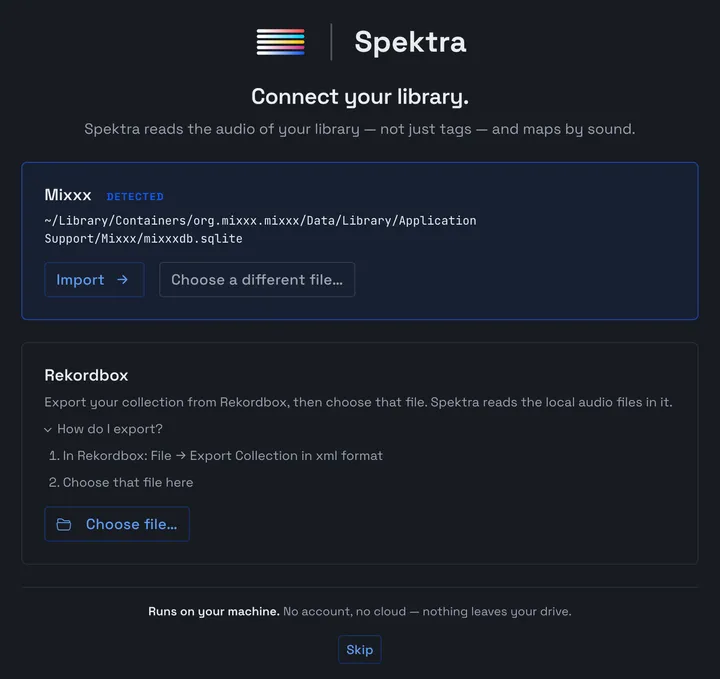
Rekordbox libraries get a Link File in Settings that carries every saved playlist back into Rekordbox.
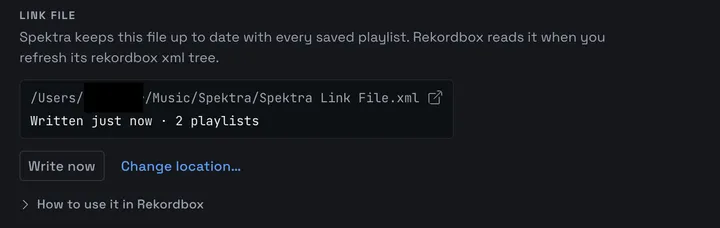
A Feedback panel, opened from the sidebar or the crash screen, sends a bug or idea, optionally with a recent log you can read first.
Short tracks (ie, loops and samples) can be kept off the Observatory and out of plotted Courses by default, with the cut-off set in Settings.

Settings can replace the current library with another, and offers to back up its playlists before they are deleted.
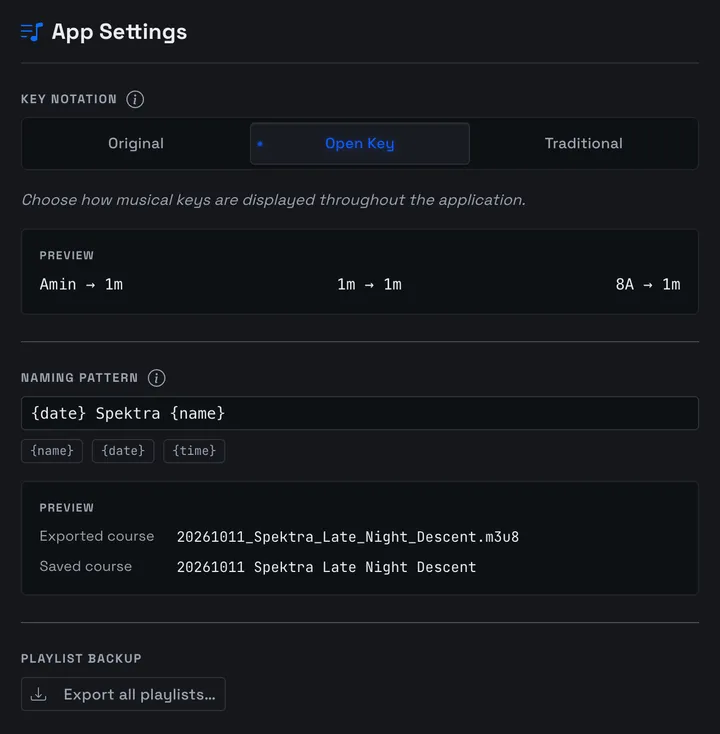
"Export all playlists…" under Playlist Backup in Settings saves every playlist as an M3U8 file.
Settings lists the tracks a library's analysis could not get through, with the reason, and lets you clear an unreadable one to retry it.
Exporting M3U8 for a Rekordbox library warns how many tracks Rekordbox will skip because of a
#in their path.
Changed
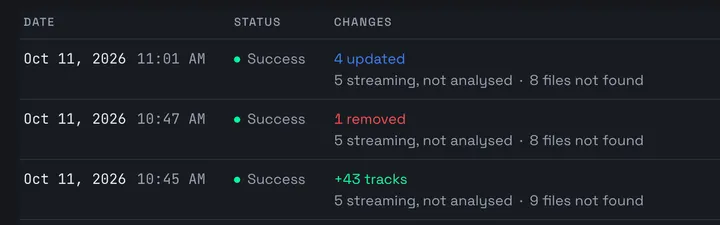
Each sync history entry lists streaming tracks and files not found, and a failed sync shows its error in full.
A library whose file has gone missing is flagged in Settings, with Locate file… as its action.
Locate file… refuses a file that holds a different collection and offers Replace library… instead.
Track details and sync history use your DJ software's word for collections: Crates for Mixxx, Playlists for Rekordbox.
The second analysis step is now called "Audio Embedding" in the status bar and the Observatory.
The log file records ids instead of track, playlist and library names, and masks your home folder and drive names.
Spektra now runs on Electron 43, and its audio tag reader is updated; both updates carry security fixes.
The note in the About window is shorter.
Fixed
One unreadable file could stop a library's analysis for good, leaving the rest of the library only partly analysed.
Retry on the Observatory's "Nothing to map yet" screen did nothing.
Pausing analysis partway through Spectral Analysis could let its later steps run anyway.
Choosing a track colour in the Observatory filters had no effect until Plot Course was pressed.
Track search handles characters with accent marks
In a playlist with a missing track, play buttons below it started the wrong track and highlighted the wrong row.
After a sync, the playlist view and Recon Deck could keep playing a track that had been removed or moved.
In Path mode, Plot Course ignored the chosen Harmonic Mode when picking the track that bridges two anchor groups.
The sync toast said "No changes" when a sync had only added or removed crates.
v0.9.1
Added
The Recon Deck can now be dismissed. An "End Recon session" control sits at the right of the deck in both its compact and expanded states; ending a session stops playback and cancels any waveform work still queued for it.
Prism now draws an empty radar for a playlist with no analysed tracks and says so, instead of leaving a hole in the panel.
Changed
The Recon Deck's waveform gets the room it was missing: at 1280px wide it now shows at roughly 450px instead of 239px, and it can no longer be crushed to a sliver at narrower widths. Played and unplayed audio are drawn in distinct colours so the playhead is readable, and a track whose waveform analysis failed now shows a failure state instead of a shimmer that never ends.
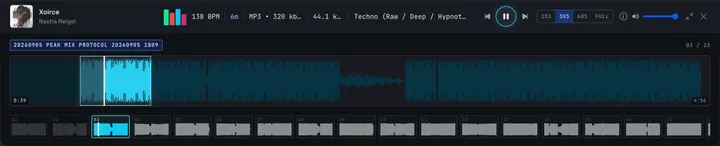
The Recon Deck's expanded metadata row no longer hides sample rate and genre off the edge of the panel; missing values are dropped rather than shown as a dash.
The Recon Deck's playlist strip reads as a sequence: tiles carry track numbers, tracks already auditioned recede, and the playing tile holds still instead of pulsing.
Prism reads as one instrument: its three panels share dividers, labels and a single type style, every measurement is set in the same monospaced figures as the stats bar above it, and the harmonic meter is a segmented LED meter whose lit cells match the transition count rather than a solid bar that always read as full.
Prism can be operated from the keyboard: the collapse/expand header is a real button, and the attribute picker takes arrow keys in both its collapsed and expanded forms.
Prism's charts follow a theme switch immediately instead of keeping the previous theme's colours until the next redraw.
On playlists past about 80 tracks, The Journey draws only the playing marker instead of a dot per track, so the trace no longer fuses into a blurred line.
Below 1200px wide, The Journey moves to its own full-width row so the radar's axis labels no longer clip against the panel edge.
Optimize moves from Prism's footer to the Harmonic Flow label line, where it no longer fights the legend for space at 1280px.
The playlist header no longer collides with itself at 1280x1024: name over description on the left, actions over measurements on the right, at a lower overall height. Long names truncate, and duration and BPM are set in monospaced figures.
The Tracks Table has been tidied: column widths are trimmed to what each cell needs so Title / Artist and Wave take the surplus, truncated titles and artists show their full text on hover, empty cells show a dash, missing files dim their row instead of washing it red, and a row's action menu is no longer clipped by the sticky header.
Fixed
The playlist stats bar averaged BPM across every track, including unanalysed ones, so each track without a BPM dragged the figure toward zero. It now averages only tracks that carry a BPM, and hides the stat rather than showing 0.
A playlist under a minute long showed a broken duration in the stats bar (for example "7 s" for 45 seconds).
Dismissing the Recon Deck and reopening it could show a track that had since been removed from the playlist.
With the Recon Deck open, pressing Space on a focused control (such as "Next track") toggled play instead of activating the control.
Toggling the sidebar on a long playlist froze the app for up to two seconds at full width; it is now immediate.
Prism's harmonic legend entries with a count of zero were indistinguishable from active ones.
Popover headers in the playlist filters were white text on a white background.
The Recon Deck's playback controls, volume slider and the playlist header's buttons had no visible focus ring.
v0.9.0
Added
macOS now updates in place. When a new version is available, the update banner downloads and installs it from inside the app instead of sending you to the browser; the dmg download stays available as a fallback if an in-app install fails, for example when Spektra is still running from your Downloads folder.
Launching after an update no longer sits with no window while the database is upgraded. Spektra opens immediately and shows backup progress, then each upgrade step, before the Observatory appears. If an upgrade fails, the screen stays up, names the backup taken beforehand, and offers to reveal it and the logs.
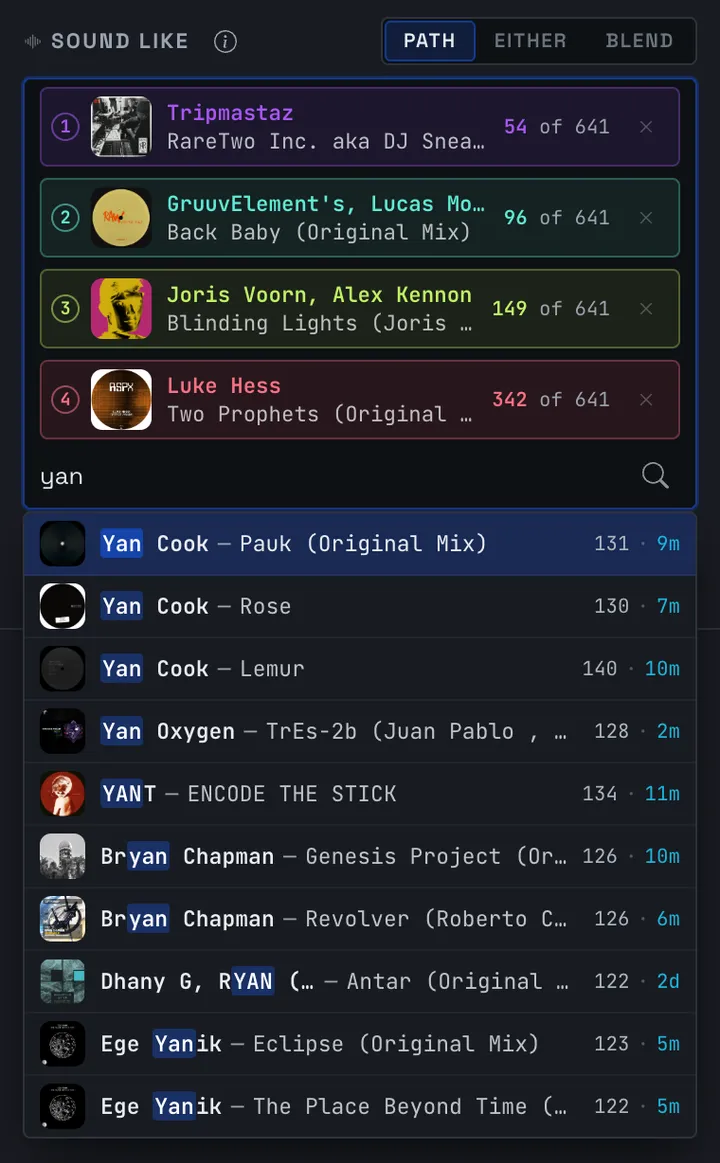
Sound Like suggestions now show cover art, BPM and key for each match, and highlight the part of the artist or title that matched what you typed, so near-identical entries in a library can be told apart before you pick one.
Changed
Course lines in the Observatory keep their anchor colour over bright clusters instead of washing out to white, anchor numbers sit on a badge rather than a bare digit, and markers near the top edge flip below their star instead of being clipped.
The "NO BPM" column in the Observatory is easier to distinguish from the gridlines, and its caption now sits on the column it names.
The Trajectory popover groups the harmonic and Energy envelope controls beneath the mixing profile cards, tints them in the chosen profile's colour when a preset rewrites them, and shows a "Tuned" mark when the pair no longer matches any preset.
The Trajectory popover and the export menu on the transport bar can be opened, operated and closed from the keyboard, with focus returned to the control that opened them.
The track list in the right rail moves the Audition button next to the play-order number, aligns BPM and key into fixed columns, and shows the full title or artist on hover when it is truncated.
The Sound Like chip's in-pool count puts the number that differs first and mutes the shared "of N".
The transport bar's pool count is formatted with thousands separators.
The transport bar's Save button explains its state on hover: plot a course first, already saved, or save this course as a playlist.
Fixed
Pressing Escape while the Trajectory chip or export caret had focus did nothing; it now clears the focused Star as it does elsewhere in the Observatory.
In compact layouts, a Star's tooltip or pinned popover could be placed underneath the expanded right rail where it could not be seen. Overlays now stay clear of the drawer.
The update banner offered the installer download link after any error, including a failed update check on a machine that had gone offline, and did not dismiss. The link now appears only after an in-app update was actually attempted.
On macOS, an update that failed its signature check after download was never reported, so "Restart Now" could wait indefinitely. Install failures are now surfaced and offer the dmg fallback.
Analysis and update checks no longer start until the database upgrade has finished.
v0.8.11
Added
A Naming Pattern setting names a Course as it leaves the Observatory — the playlist you save and the file name suggested when you export.
{name},{date}and{time}fill in at that moment and anything else you type is kept as written, so{date} - {name}saves a playlist called20260906 - Late Night Descentand suggests20260906_-_Late_Night_Descent.m3u8. The default is{name}, which is what Spektra did before.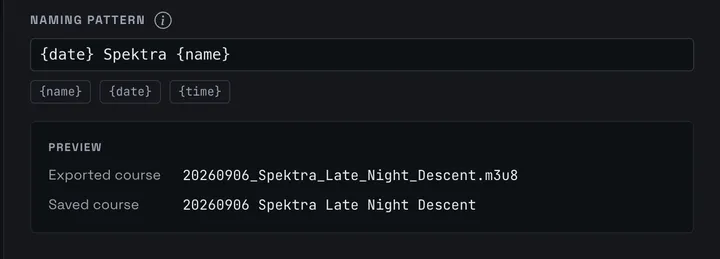
The update banner offers "What's new" for the version it is asking you to install, and App Settings links to the release notes for the version you are running. Both open the changelog at getspektra.app.

Changed
In the Variant popover, a version's title now leads with what tells it apart — the shared composition name recedes and the trailing "(Extended Mix)" keeps full weight.
A Variant whose BPM or key differs from the placed version is marked by weight and named to a screen reader, not by color alone.
The Variant popover takes focus when it opens, so Audition and the substitution are the next things you reach from the keyboard, and closing it — or substituting — puts focus back on the course row it came from. Screen readers now read its contents; it announced itself as a tooltip before, and its buttons could be skipped entirely.
A Variant lists its play count and rating; the last-played time no longer appears.
App Settings names your platform — macOS, Windows, Linux — instead of the build identifier (
darwin,win32)."Check for updates" stays where it is after a check instead of being replaced by the result, so you can check again without reopening Settings.
Settings buttons read in sentence case: "Show log files", "Report a bug", "Request a feature".
Fixed
An update check that fails no longer leaves Settings spinning on "Checking…" with no way back — it now says "Couldn't check right now".
Copying the support address reports what actually happened: the address stays on screen with "Copied" beside it, or "Copy failed" when the clipboard refuses. It previously looked like it had worked either way.
v0.8.10
Added
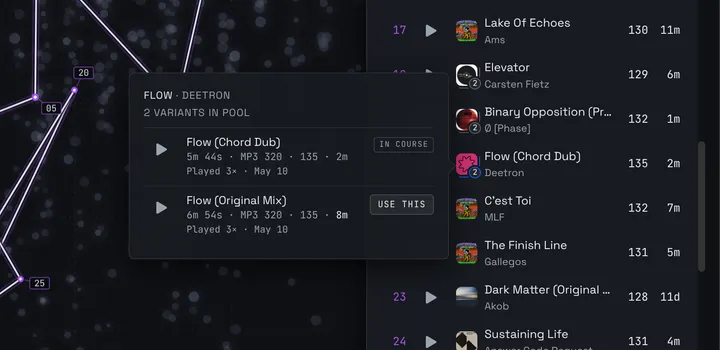
Plotted courses now disclose how many alternate versions of a composition were set aside, marked on the affected route rows.
A variant popover lets you swap in a held-back version without replotting, showing each version's full title, file, and how it departs from the placed track.
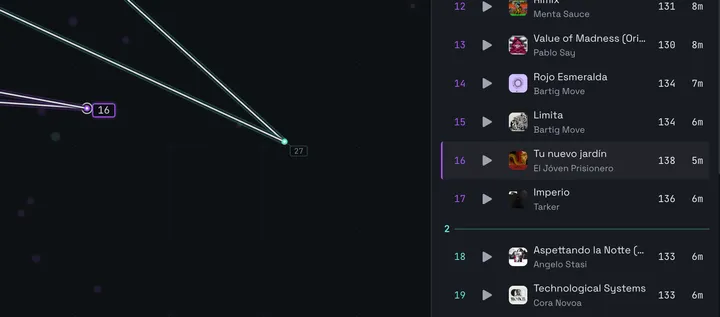
Clicking a route row in the right rail now pans the Observatory to bring that star into frame, keeping your current zoom.
Changed
A plotted course places only one version of a composition — no more two takes of the same track competing for adjacent slots.
The manual update link now points to the right artifact per platform:
.dmgon macOS,.deb/AppImage on Linux.Hovering a right rail row highlights it without popping a tooltip.
The Settings panel heading is now "App Settings".
Fixed
Restarting to install an update no longer strands the installer — the app quits cleanly so the new version is actually applied.
The backup Spektra takes before a database upgrade is now complete. Previously it could come out partial, or empty.
Backup retention now counts only real backups. It previously counted some of Spektra's own working files as well, and could silently prune three backups down to one.
Tracks not visible in the Observatory can no longer be selected.
v0.8.9
Fixed
Windows: track playback and Recon Deck audition now work for files on drive-letter (
C:\...) and network (\\server\share) paths, which previously failed to load with an unknown-file error.
v0.8.8
Fixed
Playing a track no longer quits Spektra with an
Invalid state: ReadableStream is already closederror. Seeking, or switching from one track to another, could trigger it.Audio playback keeps working on the updated Electron runtime, which otherwise left tracks failing with a format error.
A file that can't be read mid-playback — moved, permissions changed, drive disconnected — is now recorded with the actual reason instead of surfacing as an unexplained media error.
Changed
Updated Electron and other dependencies to pick up security fixes.
v0.8.7
Fixed
ALAC
.m4atracks now play instead of staying silent — playback routes on the file's actual codec rather than its extension, so Apple Lossless files (including hi-res and Native Instruments.stem.m4astems) are converted on demand for the audio deck..m4a,.m4b, and.mp4files carrying any codec the player can't decode natively now fall back to conversion rather than failing to load.
v0.8.6
Added
AIFF playback.
.aif,.aiff, and.aifctracks now play in the Recon Deck and anywhere else Spektra auditions audio — they were importable, analyzable, and plottable, but silent. Files are converted as they stream, with nothing written to disk, and seeking, cue jumps, and scrubbing all still work.
Changed
The Sonic Observatory now opens as soon as one track has been analyzed, instead of waiting for the entire library. Plot Course still waits for embeddings, but only when the search space is genuinely incomplete.
A track in a format Spektra can't play now says so by name, rather than the generic "Could not load track".
Generated playlists now draw only from tracks that have sonic data. Manual track search still searches your whole library.
Fixed
A library containing tracks that can never be analyzed — silent separators, corrupt files, clips shorter than one analysis frame — no longer holds the Observatory shut forever. Those failures are now recorded and classified once instead of being retried on every launch. Tracks that failed only because a drive was unplugged are still retried when it comes back.
Sonic neighbors and plotted courses no longer search a stale snapshot of your library during an analysis pass. Dropping an anchor at 10% complete searched only that 10%; each new embedding is now visible to the next search.
Pausing an analysis pass now refreshes the Observatory's track counts and plot, rather than leaving them showing what they held when the pass started.
Stars no longer jump to new positions on every filter change or dropped anchor — each track's position in the plot is now stable across redraws.
v0.8.5
Changed
Spektra no longer requires an active license key to check for or install updates during the free beta — keyless beta installs now stay current instead of being stranded on the build they were downloaded with.
Sonic Observatory panning and zooming are substantially smoother on large libraries — 60,000 tracks, zoomed all the way in.
Dropping an anchor is much faster at scale — on a 30,000-track library, about 23 seconds down to about 1, end to end.
Changing anchors applies in about half the time it used to.
Large libraries load faster and use less memory.
Fixed
Dropping an anchor on a very large library (~60k tracks) no longer fails outright with a database error.